26/7/2020
I add the time limitation of the collecting task. The game will end if the player cannot finish the requirement in a limited time.

Also, I updated the NPC script and also did some debugging process of the game.
CodingMama(Group 21) – Lau Yin Ling 54804070
26/7/2020
I add the time limitation of the collecting task. The game will end if the player cannot finish the requirement in a limited time.
Also, I updated the NPC script and also did some debugging process of the game.
21/7/2020
In this final stage, I integrated all tasks together and fixed the bugs again. For example, NPC sliding problem while they was walking, updating the traffic light material to control the traffic lamp to countdown and change colour and so on.


16/7/2020
I am mainly adding a new task according to our updated story this week. But there’s still some bug here waiting me to fix it later.

I improve the player perception to the game by adding some details:


8/7/2020
Some content of the story is finally done. I add the dialogue into the corresponding NPC so that player can interact with them.

To help player know the current game process, I add the minimap on the top-right corner and also the quest system on the top-left corner.
The minimap will always follow player’s position and update the view every frame.


2/7/2020
This problem happens when I change the speed of the nav mesh agent. The character animation is not smooth.

I think the problem is caused by the character is moving so fast that the character arrived the destination before it update the next destination. The problem can be solved by updating the script.


25/6/2020
When we are working on a big scene, we find out that the game performance drop rapidly. The maximum frame per seconds (FPS) on my computer is only 9 FPS, which is extremely low FPS and it disturbs my working process due to the big latency.


To reduce the CPU usage, I temperately disable the shadow on the scene in order to improve my working environment. But I am not sure if this problem happens on editor only or also happens on the final game output.
So, we are now exploring the method on reduce the CPU usage of the game via the following methods:
16/6/2020
I add the HP function to check if player is dead under slime attack or not.
But the HP bar reduction effect was not worked as expected. It keeps reducing HP after receiving any hurts, and it will fill the HP value when player receive next damages.

The problem is probably caused by the script is receiving the wrong HP value. Because the HP bar need a floating value to set the HP deduction effect, the dividing result of two integer value always return a 0 value to it. So I correct the commands as following.
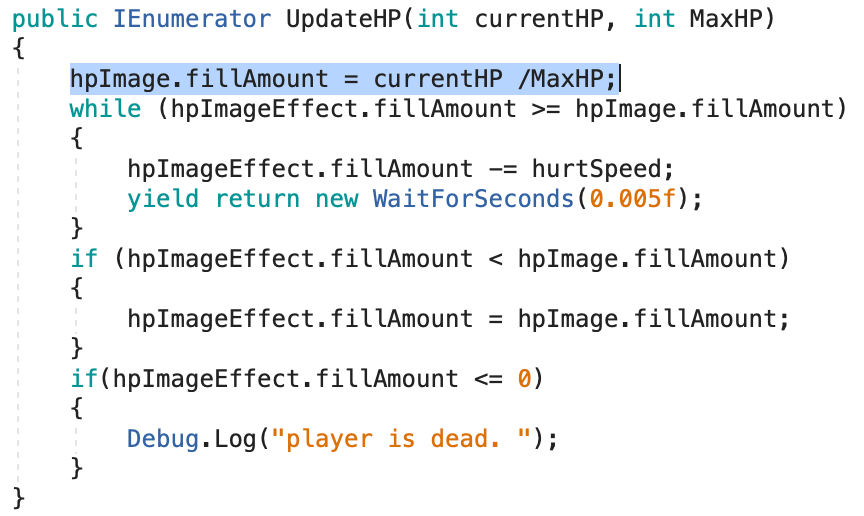
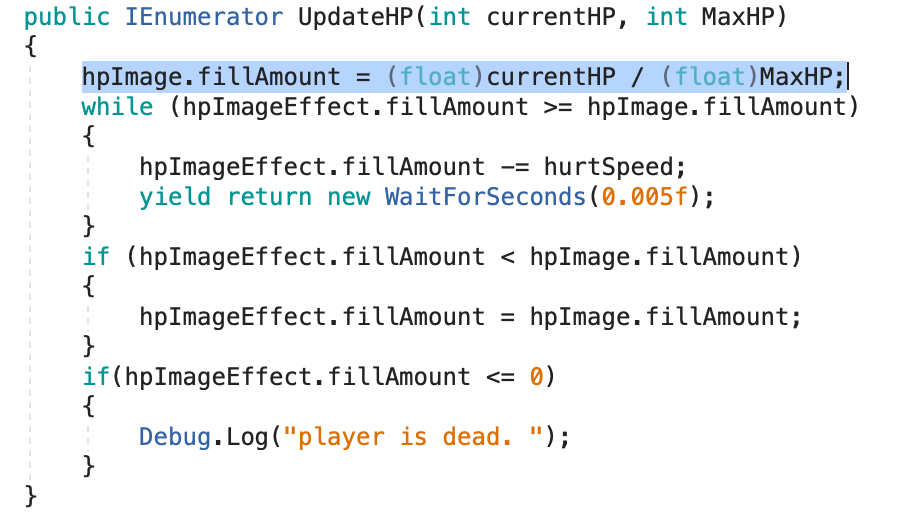
And it works fine now, even there are more than one slime that is attacking the player.


11/6/2020
To make the shooting game playable, I make 5 spawn of monster. The next spawn monster will appear immediately when all monsters of current spawn are dead.

3/6/2020
To provide better playing environment for the player, I enhanced the interact function again.
1. Player can interact with the object that is covered by the character


2. An UI icon will appear when the hovering object can be interacted

27/5/2020
The current shooting method allow player to shoot the bullet without any limitation, so I add a variable to control the player’s shooting speed.


 Afterworld